Friday, 21 November 2014

BBC Newcastle

Introduction
Today we went to BBC Newcastle where they do the look north news. We had to take pictures of the BBC Newcastle of the stuff they do at the studio and the radio station at the studio and taking pictures of all the equipment they used for the news e.g. cameras, lightning and the green screens they use to show videos clips or images and even for the weather report. As you can see below these images show what the staff do at the BBC Newcastle and what equipment they use at the studio for the news. What I particularly want to see today is the BBC studio where they do all the reports about the north east and to meet the anchorman of the BBC look north and to find out what he does and how he got to do that job on the news and to find out how much he gets paid.


 This is the entrance to the BBC Newcastle studio with all the faces of the people who work there or who use to work there.


This is a photo of all the tapes from the BBC news since the 1970's until today. These old tapes are recordings from the news that was the air with other news reporter from the 1970's until today.

This is a photo of the studio where they tell the news reader to look at the camera or tell them to look at other cameras and they also control the lightning the videos the audio and they repeat the videos from early on from today and also they tell the camera men to move onto the other side or tell them to make the camera more in focus.


This photo here is a picture of the BBC news timeline on how the radio changed and how the TV changed with new cameras, new TV's and an update radio to make the radio sound good, so you can hear the voices from the BBC news radio.                                                                                                        
This photo here is old equipment that they used in the 1950's BBC new. Now they don't use this equipment anymore as it is old, useless and doesn't work anymore.
This photo here is a picture of me with a screen in the background. What this screen does is to help the weather person to see the weather in the background behind him, so it's like a reflection off a mirrior.
This photo here is a picture of a camera. What this camera does is to add the picture of the UK and to show what the weather is going to do in Britain.
This photo here shows a picture of me with a green background in the back.
This image here is an old studio of an TV show thats not anymore. That TV show was for children.
This image here is a picture of the camera equipment they use for the BBC news look north to film the lead news reporter to talk about the stories that are happening in the north east.
This picture here is a picture of the news reader who reads the news to tell everyone what has happened in the past week or even happened today.
This image here is too show the weather reporter what he or she is doing and to see what the weather is going to be like for tomorrow or for this week.
This image here is picture of lights that they use for the news report to add more light to the stage where the news reader will be reading.
This image here is a picture of the radio room where they do there broadcasts for the BBC look north news for people who live in the north east.
This image here shows a radio reporter reporting the news on the radio to tell people what is happening across the north east for example the radio normally talks about traffic happening on week day morning.
In this image here, this is where they do the editing for the radio broadcasts and to do the volume for the radio broadcasts is well.
In this image this is where they do the scripts on what the news readers and the other broadcasters need to say on the news to be put on live TV in front of millions of people.

Friday, 7 November 2014

Details about my challenge


6 examples of the kind of images  that I want to produce in Photoshop


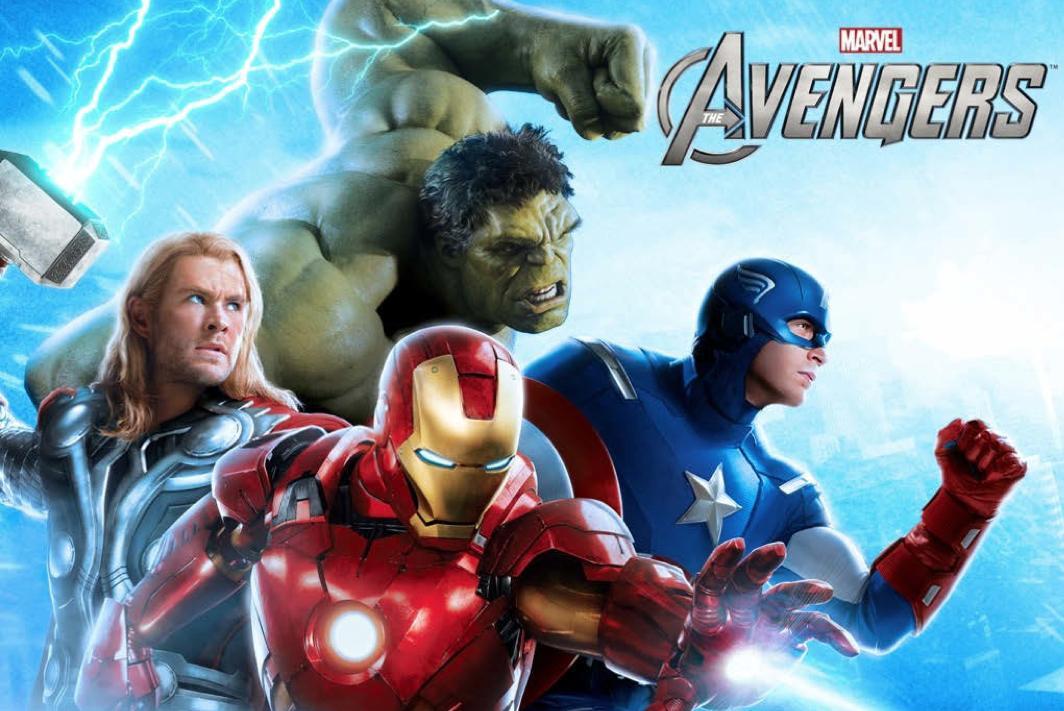
 have picked this poster because it has brighter colours and it shows it's not that violent and it's fun. This poster shows what I want to do in my silver arts award challenge by adding effects to the image like for example it shows the effects of lightning. This is new to me is because of the effects of the images with the hulk and the blue effects of the lightning and the blue colour.


I have picked this poster because they have taken the images seperatly and they have put the other image behind the other and the colours are darker so the TV show is serious and the title shows it is a criminal film. the reason I chose this image is because of the title they have done adding the text to the poster and changing the writing font. This is new too me because with the title with science element boxes to show that it is science and drugs and with the dark colours of yellow to show it is serious.

I have picked this image because they cut out the
photo and put it in a background. The reason I chose this image is because is the background is because they have used dark colours to describe the TV show as a dark show and I am planning to have a plain white background to make the images stand out more as the images will be silhouette images. This image new too me because they have taken pictures of Sean Bean with him sitting in the chair when they are using a green screen in the background to add effects or too add a colour in the background.


I chose this image because they have used a lot of effects in this doctor who poster. In the background they have got David Tenant and Mat Smith. They took the both of them together in the studio.  They took John Hurt seperatly with a green screen in the background adding effects to the poster to make the poster more interesting to look at. This image is new too me because they have used effects of space and aliens to show it is an alien tv show and with the green screen they have taken Matt Smith and David Tennant together with a green screen in the background.


For my own challenge, I would like to produce:
A film or TV poster, based on images from the Internet, to show skills in digital imaging and Photoshop. This will be new to me, because I have not done a lot with PhotoShop and image editing before this course.


Strengths and weaknesses
The strengths that I have are:

  • I can change the opacity by making the image fade are invisible.
  • I can change the colour of the image by making the image black and white or having bright colours.
  • I can use the rubber tool to rub out the background or any other stuff I don't want.
  • I can use the filter gallery by changing the image into a painting style, cartoon style or even make the images a silhouette image.
  • I can change the angle of the image by going on edit and going on transform and move the image anywhere.
The weaknesses that I have are:

  • I don't know what every tool does on photoshop.
  • I don't know how to add other images to the poster.
Planning and Resources

The resources that I will need are:
  • An apple mac computer or PC.
  • Adobe photoshop.
  • A camera just incase I want to take pictures of my own poster.
  • Internet connection
Hardware and software 

Adobe photoshop
  • Google images
Stages in my challenge:

1. Preparing planning and how to set out my challenge
2. Collecting suitable images from Internet
3. Watch youtube tutorials on how to use PhotoShop.
4. Make my TV/film poster
5. Update my blog to explain how it was all made
6. Share the work produced for my challenge with others and get feedback.
7. Review the work I have produced for my challenge.